
GTM tech stack · Go-to-market tools · Pricing
The GTM tech stack eight layers, three stages, real prices
A GTM tech stack is the set of tools a B2B company uses to find buyers, reach them, sell to them and measure what worked.
Most teams buy it one tool at a time and end up with eight logins, three copies of every contact and no single answer to "where did this deal come from?"
This guide splits the stack into eight layers, says what to buy at seed, Series A and scale, and lists what each tool costs today, from each vendor's own pricing page.
It ends with the stack GTM Quest runs on, warts included.
Reviewed by Dan Keegan, GTM Quest · October 16, 2026 · 19 sources linked below
The Quest Systemour own GTM stack, in four parts
- 01System of recordALWAYSNEON POSTGRES
- 02Enrichment and signalsDAILY BATCHCLAY
- 03Research, drafts, glue codeDAILYCLAUDE CODE
- 04Pipeline and reportingLIVEYOUR CRM
Tools the client cannot export from0
01/ the definition
What is a GTM tech stack? and why most of them are too big
A go-to-market tech stack (GTM stack) is every tool that touches pipeline: the CRM, the data you buy, the signals you watch, the tools that send email and LinkedIn messages, the dialer, the analytics and, at scale, the warehouse that ties it together.
It is wider than a sales stack because it includes marketing and data.
The stack is not the strategy.
A good stack makes a clear GTM strategy cheaper to run.
It cannot tell you who to sell to or what to say.
If you are still working that out, start with what GTM is.
The common failure is not a missing tool.
It is too many.
Gartner reports that 49% of sellers say they are overwhelmed by the number of technologies, and those sellers are 43% less likely to hit quota.
Salesforce's 2026 survey found the average seller spends only 40% of their time selling.
One rule that saves most of the money
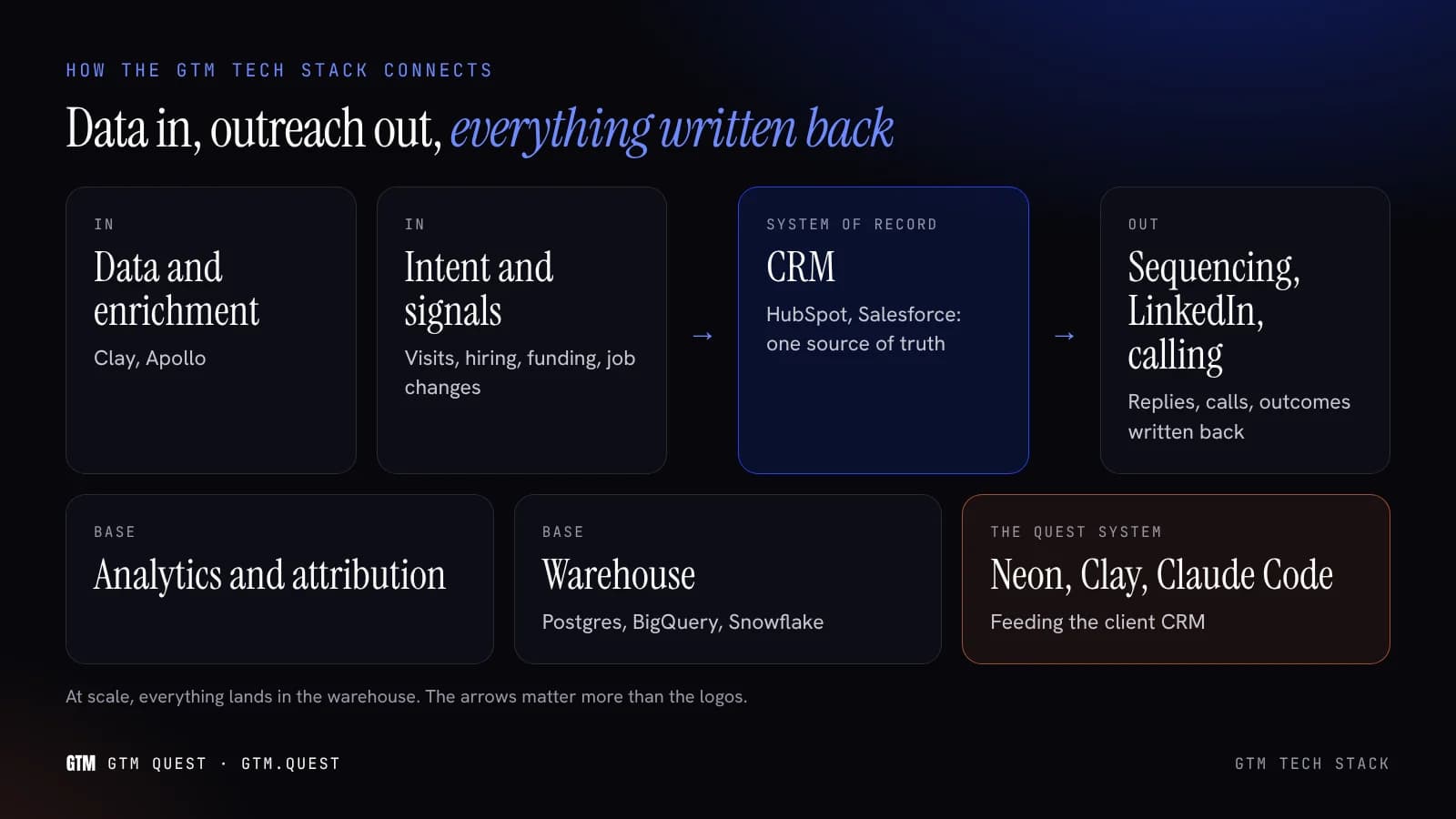
Pick one system of record for accounts and contacts, and make every other tool read from it and write back to it.
In most companies that is the CRM.
In ours it is a Postgres database that feeds the CRM.
Either works.
Two systems of record does not.
02/ the layers
The eight layers of a B2B GTM stack what each one does and when you need it
Read from the top.
The first three are the foundation; the rest multiply whatever the foundation is doing, good or bad.
Signals deserve more space than a table row.
Our signal-based selling page covers which signals are worth acting on and how to route them.
03/ list prices
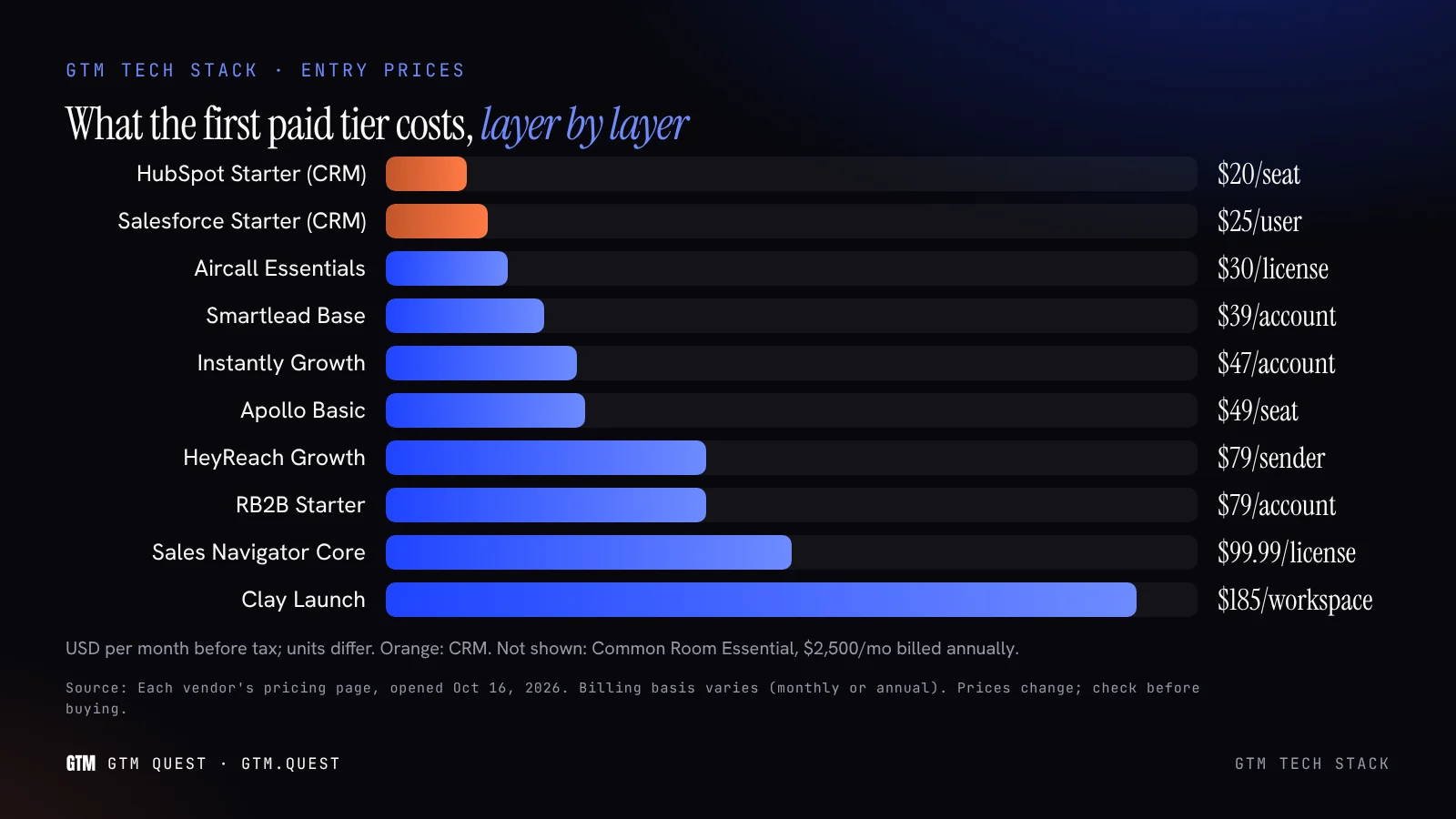
GTM stack tool prices from each vendor’s own pricing page
Checked on October 16, 2026.
US dollars, before tax.
Prices change often and promotions come and go, so treat this as a starting point and click through before you buy.
Read the unit, not the number. HubSpot, Salesforce, Apollo, Sales Navigator and Aircall price per seat.
Clay prices per workspace on credits and actions.
Instantly and Smartlead price per sending volume.
HeyReach prices per LinkedIn sender.
A five-person team pays five times for the first group and once for the second.
For the CRM decision on its own, our HubSpot vs Salesforce page goes deeper on editions, add-ons and year-one cost.
04/ by stage
What to buy at seed, Series A and scale pick your stage
The right GTM stack depends less on budget than on how many people sell and how repeatable the motion is.
Where is your company today?
Seed
Four tools and a free CRM
The founder still sells and the ICP is still moving.
Buy the minimum that lets you prospect, send and remember.
Do not buy signals or attribution yet: you do not have the volume for either to tell you anything.
- ✓ Free CRM (HubSpot Free)
- ✓ One data source: Apollo Basic, or Clay Free to learn
- ✓ One sequencer on separate domains: Instantly or Smartlead entry plan
- ✓ One Sales Navigator Core seat
- ✓ Claude for research and drafting
Skip: dialers, intent data, attribution tools, a warehouse.
Series A
A paid CRM, Clay and a second channel
Three to ten people sell, and the founder needs to stop being the CRM.
Move to a paid CRM with sequences and reporting, put Clay in the middle for enrichment and signals, and add LinkedIn automation and calling if the motion uses them.
- ✓ HubSpot Sales Hub Professional or Salesforce Pro Suite
- ✓ Clay Launch or Growth for waterfalls and signals
- ✓ Dedicated sending tool with mailbox rotation
- ✓ Sales Navigator per seller, HeyReach if LinkedIn volume justifies it
- ✓ A dialer if reps call daily
This is the stage where a GTM engineer pays for themselves.
Scale
A warehouse, governance and fewer tools
Several teams run several motions, and the problem becomes consistency.
Add a warehouse as the single place to join GTM, product and billing data.
Consolidate overlapping tools.
Put permissions and an audit trail on anything that writes to the CRM.
- ✓ Salesforce or HubSpot Enterprise
- ✓ Clay Enterprise, with warehouse sync
- ✓ A warehouse: Postgres, BigQuery or Snowflake
- ✓ Account-level signals platform
- ✓ Attribution that reads from the warehouse
Named-account programs at this stage usually need an ABM agency or in-house ABM team as well.
Not sure which stage you are really at?
Headcount is a poor guide.
Our free GTM scorecard checks whether the motion is repeatable enough to justify the next layer.
05/ for example
What a GTM stack costs by stage list-price arithmetic, not a quote
For example only: one plausible stack per stage, priced from the list prices above.
It leaves out tax, promotions, domains, mailboxes, custom quotes and the people who run it.
The bigger cost is not on any pricing page. It is the hours to connect these tools, keep the data clean and fix what breaks.
That is why we price a stack review before a stack.
If you want a person to own it part-time, fractional GTM leaders on our sister site do this work too.
06/ for agencies
GTM stack tools for outbound agencies what changes when you run many clients
Agencies running outbound for several clients have different constraints from an in-house team.
These are the ones we see matter, with the vendor features that address them as each vendor describes them.
Mailboxes
Unlimited email accounts
Agencies need many domains and mailboxes per client.
Instantly lists unlimited email accounts and warmup on its outreach plans, and Smartlead says all plans include unlimited email accounts at no extra cost.
Price by volume sent, not by mailbox.
Many senders, one inbox
LinkedIn automation for agencies is priced per sender.
HeyReach's Agency plan is $999 a month for 25 senders and includes whitelabel and a unified inbox; its Unlimited plan caps at 300 senders.
Each sender is a real person's LinkedIn account.
Treat it with care.
Data
One Clay workspace, many tables
Clay prices per workspace with unlimited seats and tables on every plan, so one workspace can run every client's tables.
Credits and actions are pooled, so budget them per client yourself.
Tag every row with the client, from day one.
Ownership
Client-owned domains and CRM
The client should own the sending domains, the CRM records and an export of every contact and message.
If the agency leaves, the pipeline history stays.
- ✓ Domains registered to the client
- ✓ CRM write-back from week one
- ✓ Monthly export to the client
Compliance
Suppression across clients
A prospect who unsubscribes from one client's campaign has only opted out of that client.
Keep suppression lists per client, and never pool contacts between them without a lawful basis.
Our cold email agencies page covers the sending rules.
Reporting
Meetings held, per client
Every client wants a report.
Build it once from the CRM or a warehouse, not by hand from five tool dashboards each month.
Report meetings held and pipeline, not emails sent.
If you are an in-house team comparing agencies rather than building, our outbound agencies and Clay experts pages list who does this work.
07/ our stack
The Quest System: GTM Quest’s own stack Neon Postgres, Clay and Claude Code
We run our own outbound and our clients' on the same three tools, plus the client's CRM and sending setup.
Here is what each part does, and what it does not.
Neon Postgres is the system of record
Every account, contact, enrichment, touch and outcome lives in a Postgres database.
The CRM gets what sellers need; the database keeps the full history.
We run jobs in daily batches rather than keeping compute always on, which keeps the database bill small.
- ✓ One row per account, deduplicated
- ✓ Full history of every touch
- ✓ SQL for any question
- ✓ Exportable at any time
Clay does enrichment and signals
Clay runs the waterfall enrichment, email verification and signal tracking: hiring, funding, job changes.
Results are written back to Postgres, so we are not locked into Clay's tables for history.
- ✓ Waterfall enrichment
- ✓ Email verification
- ✓ Signal tracking
- ✓ Writes back to the database
Claude Code writes the glue and the drafts
Claude Code builds the scripts that move data between tools, writes research notes per account and drafts first messages.
A person approves every message before it is sent.
- ✓ Integration scripts
- ✓ Account research notes
- ✓ First drafts with cited facts
- ✓ No send permission
The client’s CRM stays the seller’s home
Sellers work in HubSpot or Salesforce, not in our database.
We push accounts, signals and drafts into the CRM and pull outcomes back out for reporting.
- ✓ CRM in the client's account
- ✓ Fields, not free text
- ✓ Outcomes synced back
- ✓ Reports from one source
The honest trade-offs. This stack is cheap to run and flexible, but it needs someone who can write SQL and read code.
There is no dashboard to log into beyond the CRM, and a daily batch means signals arrive the next morning, not in real time.
For teams without an engineer, an all-in-one tool like Apollo is often the better start.
We work as a GTM agency, not a software vendor, and everything sits in accounts the client owns.
The engineering behind it is the same work we describe on our GTM engineer page.
08/ build or buy
All-in-one tool vs a composed stack which fits your team
Two common alternatives to the Quest System.
Pick one to compare.
→ Apollo's own plan descriptions put Basic at "individual sellers doing regular outbound". For one or two sellers, that is usually right. Compose when you outgrow it.
→ Both big CRMs now meter AI on credits: HubSpot includes 3,000 HubSpot Credits on Sales Hub Professional, and Salesforce Max includes 2.75M Flex Credits per org per year. Budget for the overage either way.
09/ checklist
How to audit your GTM tech stack in six steps
- 01
List every tool and its bill
Owner, plan, seats, renewal date, monthly cost. Include the ones on someone's credit card.
INVENTORY - 02
Map each tool to a layer
Two tools in one layer is overlap. An empty layer under a full one is a gap.
MAP - 03
Find the system of record
Where does a new contact land first? If the answer is "it depends", fix that before buying anything.
DATA - 04
Check seat usage
Per-seat tools with seats nobody logs into are the easiest saving.
SEATS - 05
Trace one deal end to end
Pick a recent closed deal and find every touch. Where the trail breaks is where the integration is missing.
TRACE - 06
Cut before you add
Cancel or consolidate first. Then buy the one layer that would most change pipeline.
DECIDE
We run this as a fixed-scope GTM audit.
A GTM consultant or go-to-market agency can do the same; ask them to show the deal trace, not just the tool list.
10/ what goes wrong
Common GTM stack mistakes and the fix for each
01
Buying signals before a list
Intent data on an account list you have not agreed with sales produces alerts nobody acts on.
Fix: write the ICP and the account list first.
02
Sending from the main domain
Cold email from your company domain puts your invoices and customer mail at risk if reputation drops.
Fix: separate, authenticated sending domains.
03
Two systems of record
Contacts in the sequencer and the CRM drift apart within weeks, and nobody knows which phone number is right.
Fix: one source, everything else syncs to it.
04
Annual contracts at seed
Annual billing saves money only if you still use the tool in month twelve.
At seed the motion changes faster than that.
Fix: pay monthly until the motion is repeatable.
05
Measuring tool activity
Emails sent, credits used and sequences launched say the tools are busy, not that they work.
Fix: report meetings held and pipeline by source.
06
No owner
A stack without an owner decays: broken syncs, expired seats, stale fields.
Fix: name one owner, in-house or agency.
Salesforce's survey points to the same root cause: 74% of sales professionals are focusing on data cleansing.
Cleaning data is the work a stack review is mostly made of.
15 minutes · video or phone
Book 15 minutes on your GTM stack
Send us your tool list and what each one costs. We tell you which layers are missing, which overlap and what we would cut first, whether or not you work with us.
- 0115 minutes, video or phone
- 02We look at your CRM, data and sending setup
- 03A written next step after the call
- 04Cut, consolidate or build
Pick a day that suits · live availability
11/ questions
GTM tech stack FAQ
The questions people ask about go-to-market tools, answered with list prices from the vendors’ own pages.
The set of tools a B2B company uses to find buyers, reach them, sell to them and measure results: CRM, data, signals, sequencing, LinkedIn, calling, analytics and a warehouse.
See the eight layers.
At minimum a CRM, one data source and one sending tool.
Add signals, LinkedIn automation, calling, attribution and a warehouse as the team and motion grow.
See what to buy by stage.
Typically Clay for data, Instantly or Smartlead for email with unlimited mailboxes, HeyReach or similar for LinkedIn senders, and the client's CRM for write-back.
At list prices, our example seed stack comes to about $265 a month and our example Series A stack about $1,839 a month plus onboarding.
Both exclude domains, mailboxes and people.
See costs by stage.
Clay has a free plan; Launch starts at $185 a month, or $167 billed annually, and Growth at $495 ($446 annually).
Enterprise is custom.
Prices depend on the data credits and actions you choose.
Apollo is one database plus sending, priced per seat from $49 a seat a month billed annually; it suits one or two sellers.
Clay pulls from many providers and needs more setup.
See build or buy.
Both offer unlimited email accounts and price by sending volume.
Instantly starts at $47 a month and Smartlead at $39 a month, billed monthly.
Compare the email and contact limits on each plan against your volume.
HubSpot is faster to set up and has a free plan; Salesforce is more configurable at scale.
Our HubSpot vs Salesforce page compares editions and year-one cost.
Not until you have data in several tools that nobody can join.
BigQuery's first 1 TiB of queries a month is free, and Neon Postgres has a free plan, so starting is cheap.
See the layers.
GTM Quest's own stack: Neon Postgres as the system of record, Clay for enrichment and signals, and Claude Code for integration scripts, research and drafts, feeding the client's CRM.
See the Quest System.
List every tool and bill, map each to a layer, find the system of record, check seat usage, trace one deal end to end, then cut before you add.
See the audit checklist or our GTM audit.
Usually a GTM engineer or RevOps lead in-house, or an agency.
See our GTM engineer and Clay experts pages.

Book 15 minutes · London · UK, US and Europe
Bring your tool list and your bills. We’ll tell you what to cut, what to connect and what to buy next.
A 15-minute call, a written next step, and a GTM stack built in accounts you own, on tools you can leave.
13/ sources
Every source on this page
Each figure above links to one of these. All were opened and checked on October 16, 2026.
- Gartner, Sellers need tech as a teammategartner.com
- Salesforce, State of Sales report 2026 (4,050 sales professionals, Feb 2026)salesforce.com
- HubSpot, Sales Hub pricinghubspot.com
- HubSpot, Starter planhubspot.com
- Salesforce, Sales Cloud pricingsalesforce.com
- Clay, Pricingclay.com
- Apollo, Pricingapollo.io
- RB2B, Pricingrb2b.com
- Common Room, Pricingcommonroom.io
- Instantly, Pricinginstantly.ai
- Smartlead, Pricingsmartlead.ai
- LinkedIn, Sales Navigator plansbusiness.linkedin.com
- HeyReach, Pricingheyreach.io
- Aircall, Pricingaircall.io
- Dreamdata, Pricingdreamdata.io
- Neon, Pricingneon.com
- Google Cloud, BigQuery pricingcloud.google.com
- Anthropic, Claude plans and pricingclaude.com
- Fractional Quest, Fractional GTMfractional.quest